

configure once.
play anywhere.
drumbeam is class-compliant USB MIDI and TRS MIDI Type A. Use it with Ableton, Logic, Maschine, a hardware drum module, a sampler. Anything that accepts MIDI.
Configure in any modern browser via drumbeam’s built-in Wi-Fi. Save layouts as presets. Close the browser. On stage, you just play.
not fixed pads. exactly what you need.
You decide how many zones there are, how wide each one is and where it sits along the bar. One zone for a full-bar trigger. Four for a compact kit. Eight for sample banks. Twelve for melodic control. Switch between presets with the buttons on the bar, or with a MIDI program change.
where you hit, not just how hard.
drumbeam reads precisely where along the zone your stick lands. Map that position to any MIDI CC, the way you would a knob or fader: reverb send, filter cutoff, hi-hat openness, sample crossfade. The LEDs on your side show the current position as a dot. That way you get visual feedback without looking at a screen.
the audience sees what you play.
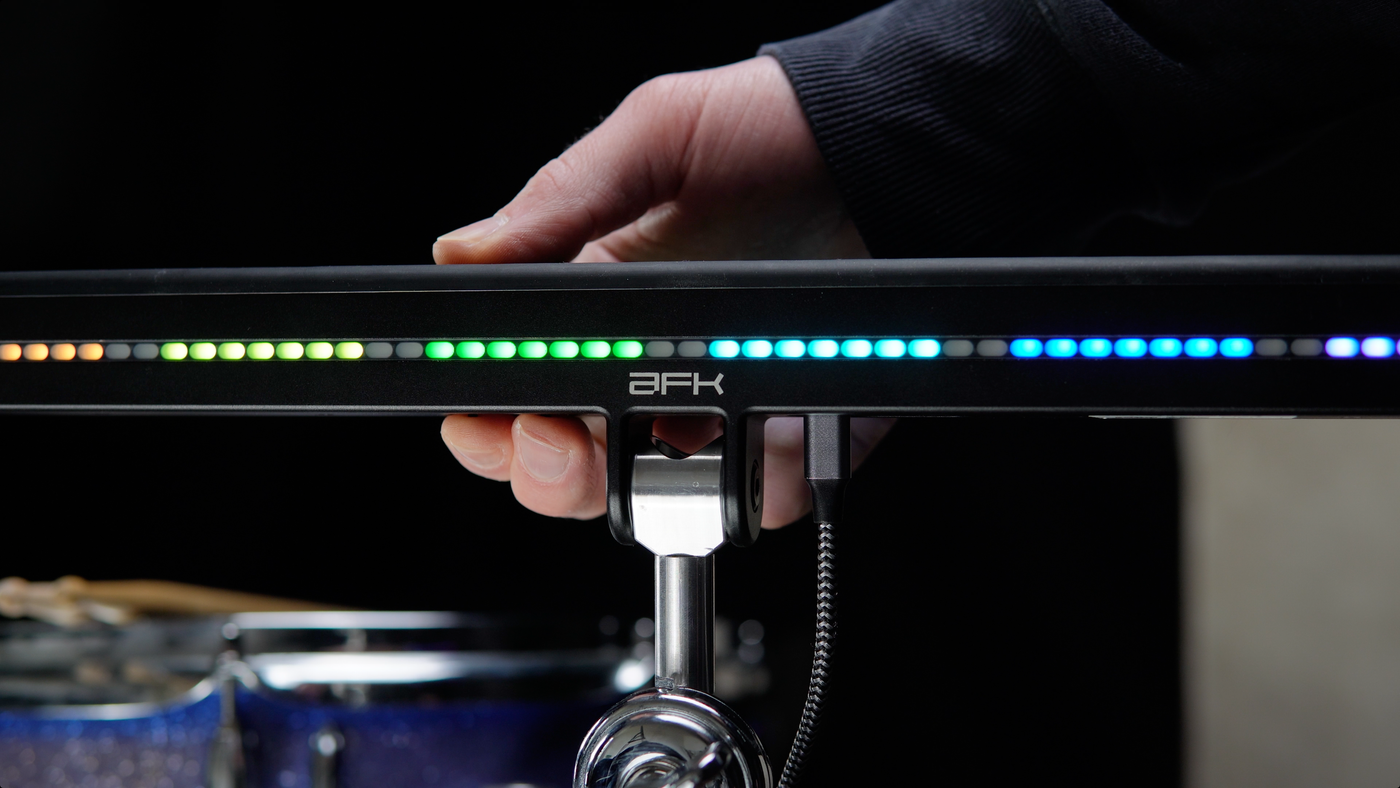
An LED interface on each side. The back faces the audience and adds a visual layer to your performance. Everything is configurable, down to zero.
configured in a browser.
nothing to install.
Connect straight to your drumbeam over Wi-Fi and open the config app in the browser on your phone, tablet or laptop at drumbeam.local.
Create your layout. Assign notes and CCs. Set velocity curves. Name your presets. Save them to the device. Close the browser. drumbeam carries the configuration with it wherever it goes.


“The afk-audio drumbeam plays excellently and the rebound is very pleasant. The triggering response is clean and reliable.”

“drumbeam is a real joy to play, and its design is a breath of fresh air, allowing you to configure it in almost any way you can imagine.”

“drumbeam is neither just another pad nor a toy from the world of controllers. It is a quasi-instrument that reimagines the concept of ‘drumming and MIDI’—striking a fine balance between innovation, playing enjoyment and practical utility.”

“Anyone looking for a controller without sound generation for drums and percussion, etc., will find the Drumbeam absolutely perfect [...] I no longer use a pad at all, as the Drumbeam offers much more possibilities and flexibility as a controller thanks to its design - and is also much easier to use”
 artist: @pietro_galvani_drummer · photo: @sfrevol
the difference.
at a glance.
tap a feature to compare against the others
| drumbeam | Roland SPD-SX | Roland Octapad | KMI BopPad | |
|---|---|---|---|---|
| configurable zone layout | 1–12 | 9 fixed | 8 fixed | 4 fixed |
| positional stick sensing | all zones | — | — | limited |
| browser-based config | any device | editor app | on-device only | editor app |
| no driver / installer | yes | no | no | yes |
| own sounds | no, MIDI only | yes | yes | no |
drumbeam doesn’t need to replace the SPD-SX as a sample player. It complements it if you chain them via MIDI.
with a laptop.
or without.
All four ports sit on the underside next to the mount, so the cables run along the stand and stay out of the way while you drum. Your drumbeam takes USB power from a computer, a phone charger or a power bank. There’s no power supply in the box.
four setups.
USB-C · power + MIDI in the box
laptop · DAW
laptop + DAW.
Plug in and pick drumbeam as a MIDI input in Ableton Live, Logic, Bitwig or any other DAW. Preset A1 sends on channel 1. Its leftmost zone plays note 36, the first pad of most drum racks, and each zone to the right goes up a semitone.
- you need
- sticks and a mount; on a USB-A port, a USB-A to USB-C cable
- computer
- yes
USB-C · power only in the box
USB-C charger · power bank
TRS-to-DIN in the box
module · SPD · sampler
drum module or SPD, no laptop.
Presets live on the bar, so the laptop stays at home. The included cable runs from MIDI Out to your module’s MIDI input, and a phone charger or power bank powers drumbeam. Factory presets send on channels 1 to 8 and drum modules often listen on 10, so set the channel in the config app first. Check that your module has a MIDI input: Roland’s TD-17, for one, only has a MIDI output.
- you need
- a drum module, SPD or sampler with MIDI In, and a USB-C phone charger or power bank
- computer
- no. You set up presets once in the browser, from your phone if you like.
USB-C · power + MIDI in the box
laptop · DAW
TRS-to-DIN · MIDI from the DAW in the box
groovebox · synth
laptop + groovebox.
Your hits go to the DAW over USB. Set soft-thru routing to USB to TRS in the config app, and the DAW can play a groovebox or synth on MIDI Out, with drumbeam as its MIDI interface. Put the groovebox on a channel your preset doesn’t send on.
- you need
- nothing else, if your laptop has USB-C and the groovebox a 5-pin MIDI input
- computer
- yes
USB-C · power + MIDI in the box
laptop · DAW
6.3 to 3.5 mm adapter not in the box
Roland KT pedal
TRS-to-DIN in the boxoptional
MIDI footswitch
kick pedal + footswitch.
A Roland KT pedal on the trigger input plays its own note, so you get a kick under your foot while the sticks stay on the bar. With program change turned on, a MIDI footswitch on MIDI In changes presets between songs. Some footswitches count programs from 0, so check which number loads A1.
- you need
- a 6.3 to 3.5 mm adapter cable, and a MIDI footswitch if you want one
- computer
- yes

the ports.
usb-c.
USB-C to USB-C cable in the box
view details: usb-c.
Power and USB MIDI share one cable, no drivers required. Your drumbeam needs at least 0.4 A, and you can match the LED brightness to the port. The small thread next to the port takes the screw of our optional locking USB-C cable. That keeps the plug in on stage, even if someone trips over the cable.
trigger in.
adapter not in the box
view details: trigger in.
The trigger input is a 3.5 mm minijack. Five parameters let you match its sensing to common pedals like the Roland KT-10 and to piezo triggers.
midi out.
TRS-to-DIN cable in the box
view details: midi out.
3.5 mm TRS MIDI, Type A, the official MIDI standard. The included TRS-to-DIN cable ends in a 5-pin plug for the MIDI input of a drum module, sampler, drum machine or synth.
midi in.
second TRS-to-DIN cable if you use Out too
view details: midi in.
Receive MIDI and route it to the outputs. Switch presets with MIDI program change. MIDI In also lets you connect several drumbeams.
flexible midi routing.
flexible midi routing
- USB to TRS
- Your DAW sends MIDI through drumbeam to gear on MIDI Out.
- TRS to USB
- A controller on MIDI In reaches your DAW.
- TRS to TRS
- MIDI from In passes on to Out while you play.
All three are options you switch on in the config app.

screw it on.
or clamp it.
The included multi-mount offers two clamp diameters and an M8 thread for flexible mounting.
the sleeve.
11 mm at one end, 13 mm at the other, with an M8 thread inside. To change the diameter, unscrew it from the base and flip it.
tilt.
Set how tight the joint is with the included hex key. Tighten the screw until a hard hit no longer moves the bar.
screw on · M8
boom arm.
you needa cymbal stand
view details: boom arm.
Screw drumbeam onto the bolt. Most cymbal stands use M8 there. A few light or older stands have a 6 mm or 1/4" post that won’t fit, so use a clamp on those.
desk stand.
you needthe desk stand
view details: desk stand.
Our desk stand has an M8 thread on top and a weighted base that keeps the bar steady.
desk clamp.
you needthe desk clamp
view details: desk clamp.
The desk clamp mounts on a tabletop or a beam.
mic stand.
you needone adapter, two on a 5/8" stand, not in the box
view details: mic stand.
Mic stands don’t use M8. You need a matching adapter. A table mic stand is fine at a desk. To play standing up, use drum hardware.
clamp · 11 or 13 mm
multi-clamp.
you needa clamp that holds 11 or 13 mm
view details: multi-clamp.
Flip the sleeve so the size your clamp takes is at the bottom end, slide that end into the rod holder and tighten the screw. Make sure your clamp fits 11 or 13 mm.
boom joint.
you needa cymbal stand with a joint for 11 or 13 mm
view details: boom joint.
On some boom stands you can take the arm out and clamp the sleeve in the joint where the arm sat.
clamps that take the sleeve.
clamps that take the sleeve
| Tama MC66, MC56 | rod holder 9–12 mm | 11 mm end |
|---|---|---|
| Tama MC67 | rod holder 12–25.4 mm | 13 mm end |
| Tama HPS80W pad stand | rod holder 12–25.4 mm | 13 mm end |
| Meinl PMC-1 | tube clamp 13–34 mm | 13 mm end, at its smallest setting |
Published ranges, checked in September 2026, not our own tests. Before you buy a clamp, check the range of the holder the sleeve goes into yourself.
built
to gig.
Mounts, cases and cables made for your setup.


all the details.
Physical
Zones
Connectivity
Power
Presets
Mounting
got questions?
Can’t find your answer? Our support team is happy to help. You can reach us by email.
do I need a laptop on stage?
No. Your presets live on the device, and with the included MIDI cable drumbeam plays a drum module, sampler or synth on its own. If you run Ableton for samples and backing tracks anyway, plug drumbeam in over USB-C and it plays along.
what makes it different from a standard drum pad?
Most drum pads have a fixed layout: four, six, or nine pads in a grid. drumbeam has one continuous surface you divide into zones yourself. The number, size and position of those zones is fully yours. It also reads stick position within each zone, which standard pads don’t do.
does it work with my DAW?
Yes. drumbeam is class-compliant USB MIDI. It appears as a standard MIDI controller in Ableton, Logic, Maschine, Bitwig and any other MIDI-capable software, no drivers needed.
can I use it with hardware, no computer at all?
Yes. Connect via the included TRS-to-DIN MIDI cable to any hardware drum module, sampler or synthesizer. Set up your presets once in the config app, then use it completely standalone.
will I be able to hit the zones accurately?
The LED strip shows you exactly where each zone begins and ends. There’s a learning curve if you’re used to fixed pads, but 12 zones is playable with practice. Most setups use fewer.
will I pay customs or import fees?
No. You’re in the EU — VAT is included in the price and there are no customs fees. Ships from Germany, usually the next business day.
what’s the return policy?
You have the EU’s 14-day right of withdrawal: return drumbeam within 14 days of delivery and you get your money back. The cost of sending it back is on you. Please email support@afk-audio.com first.
what does the warranty cover?
Every unit, including B-stock, comes with the 2-year statutory warranty. If something is wrong with your drumbeam, email support@afk-audio.com with your order number and we’ll sort it out, usually within 48 hours on business days.

Sequences, toggle zones and preset switching by hit.
read the deep dive